
Author: cheena

“Starfield Almagest Jackpot Code Combination Guide Claim Your Riches on Olympus”
Starfield, the expansive and immersive space exploration game, offers players the opportunity to strike it rich with the Almagest Jackpot Combination. This elusive code promises a windfall of free Credits, and our comprehensive guide will lead you through every step of the process. From obtaining the code to collecting additional loot, we’ve got you covered. Let’s embark on this exciting journey to the planet Olympus, where fortune awaits. Step 1: Understand the Objective In Starfield, the Almagest Jackpot Combination is your ticket to free Credits. The game’s universe boasts multiple planets and space stations for exploration, and the elusive code can be found on the planet Olympus, once a thriving casino hub. Step 2: Obtain the Jackpot Combination Code Before venturing to Olympus, you’ll need the Jackpot Combination code: 12, 19, 36, and 5. Keep this code handy for your journey. Step 3: Navigate to Olympus Step 4: Dock and Enter As you approach the Olympus space station, dock your spaceship to prepare for your jackpot adventure. Step 5: Access Manager’s Computer (Optional) If you already possess the code, skip this step. However, if you prefer an in-game discovery, access the Manager’s computer within the station. Look for the “Jackpot Combination” option to reveal the Winning Numbers. Step 6: Locate the Jackpot Backend Step 7: Enter the Code Interact with the Jackpot Backend and input the code: 12, 19, 36, and 5. Your anticipation will be rewarded as you select “Payout Winnings” to claim 3700 Credits. Step 8: Collect Additional Loot The excitement doesn’t end with the Credits. In the same room, you’ll stumble upon valuable Mech components. Be sure to grab them. If your ship is equipped with a shielded cargo hold, you can also consider retrieving the Contraband Cache for some sneaky smuggling opportunities. Conclusion: Congratulations, intrepid space explorer! You’ve successfully cracked the Almagest Jackpot Combination and secured your share of the spoils on the Olympus station. With our guide, you’ve not only claimed your 3700 Credits but also acquired valuable Mech components and potentially lucrative Contraband. May your adventures in Starfield continue to be prosperous and thrilling!
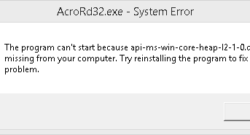
How to Fix api-ms-win-core-heap-l2-1-0.dll
Introduction: DLL (Dynamic Link Library) files are essential components for many Windows programs. If you’ve downloaded a DLL file from DLL-Files.com and need to install it to resolve issues or errors, this guide will walk you through the process step by step. Proper installation of DLL files can help ensure the smooth operation of your software. Note: Always exercise caution when downloading and installing DLL files from the internet. Be sure to obtain them from reputable sources like DLL-Files.com to avoid potential security risks. Step 1: Extract the DLL File Step 2: Place the DLL File in the System Directory Step 3: Register the DLL File By following these steps, you should be able to successfully install and register the DLL file you downloaded, resolving any related issues with your software. Always exercise caution when handling system files and make backups when necessary.